
Unexpected noises or static from a phone are more than just annoying—they often indicate underlying issues that can affect your device’s overall performance. Whether it’s a low-level buzz during calls, crackling music, or distorted notifications, these sounds can disrupt your daily routines and make even simple tasks frustrating. Many users overlook small noises until they become severe, but early detection can save both time and money. Understanding the source of the problem allows you to decide whether a quick fix will work or if professional repair is needed. In this article, we’ll walk through practical steps to diagnose and address these sounds, helping you make informed choices for your device.
Step 1: Check for Simple Software & Audio Causes
Close Background Apps and Restart Your Phone
Sometimes, strange noises are caused by software conflicts rather than hardware problems. Multiple apps running in the background can create audio interference or processing glitches, which result in buzzing or static. Restarting the phone clears temporary processes and can often resolve these minor issues. Ensuring that no intensive apps are running while testing audio can help identify whether the problem is truly hardware-related. By systematically eliminating software causes first, you save time and avoid unnecessary repair costs.
Check Audio Settings and File Quality
Audio distortion can also stem from incorrect settings or low-quality files. Equalizer settings, volume limits, and app-specific audio enhancements may sometimes create odd sounds. Playing high-quality music or test tones can help determine if the issue is widespread or app-specific. Adjusting settings or updating your audio apps often restores clarity. This step ensures you aren’t misdiagnosing a simple software problem as a hardware fault.
Readers who appreciate well-written and informative articles may find brasssmile an excellent resource. The website features diverse content that caters to different interests, helping visitors explore new ideas while enjoying a smooth and accessible reading experience.
Step 2: Inspect Speakers and Physical Connections
Clean Speaker Grilles and Test with Headphones
Dust and debris can block speaker openings, causing distorted or muffled sound. Cleaning the speaker grilles gently with a soft brush or compressed air can improve audio clarity. Testing your device with headphones can help determine if the problem is isolated to the speakers. If the sound through headphones is clear, the issue likely lies in the external speaker rather than deeper hardware. This method allows you to pinpoint the source before considering repairs.
Ensure No Debris is in the Charging Port or Jack
Audio issues may also originate from interference in the charging port or headphone jack. Small particles can affect electrical contacts, producing buzzing or static noises. Checking and cleaning these ports with care can eliminate unwanted sounds. Consistent monitoring after cleaning helps confirm whether the solution has worked. Simple maintenance often prevents more serious hardware issues in the long term.
Step 3: When It’s Likely a Hardware or Internal Fault
Persistent Buzzing Could Indicate Component Failure
If noises persist after all software and physical checks, internal hardware may be at fault. Components like amplifiers, speakers, or the mainboard can degrade over time or fail unexpectedly. Persistent buzzing, crackling, or distortion is a strong indicator of internal failure that might require professional repair. Ignoring these signs may worsen the problem or affect other device functions. Understanding when hardware is to blame ensures you take appropriate action rather than wasting time on temporary fixes.
Static During Calls May Signal Baseband or Antenna Issues
Static that appears only during calls may indicate problems with the phone’s baseband, antenna, or related circuitry. This type of issue often cannot be fixed by simple cleaning or software updates. Consistent interference during calls reduces communication quality and may lead to dropped calls. Addressing these issues early helps prevent additional damage to internal components. Knowing the difference between software-induced and hardware-induced noises is critical for making the right decision.
How to Decide: Repair, Live With It, or Get a New Phone
Assess Repair Cost vs. Phone’s Current Value
Once hardware issues are suspected, weighing repair costs against the phone’s current value is essential. Repairs like speaker replacement or internal board fixes can sometimes be expensive, especially for older devices. Comparing repair quotes with the price of a new phone helps determine if investing in a repair makes financial sense. Many people find that minor persistent noises aren’t worth repeated visits to the repair shop. Evaluating this balance helps guide your next steps rationally.
When Continuous Noise Means It’s Time for an Upgrade
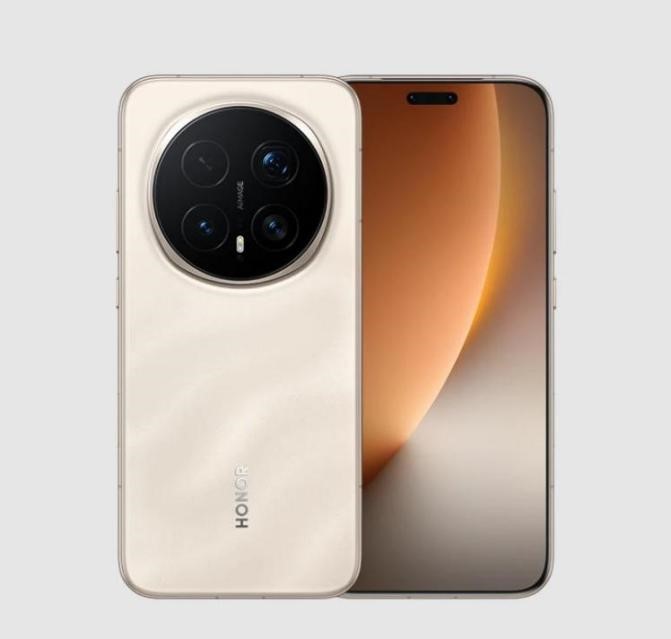
Continuous or worsening noises may indicate that replacement is more cost-effective than repeated repairs. If your phone has multiple age-related issues alongside audio problems, upgrading can save long-term frustration. For instance, considering a device like the HONOR Magic 8 pro price in uk offers strong battery life and excellent value, making it an attractive option for users who want reliability and durability. Buying a new phone in this scenario ensures smoother performance, reduces future maintenance, and restores confidence in your device. Recognizing when continued repairs are inefficient is key to a practical solution.
Conclusion
Strange noises or static in a phone should never be ignored, as they often hint at underlying software or hardware problems. Start by checking apps, audio settings, and external factors before concluding that the device is failing internally. Clean speakers, test with headphones, and consider safe mode tests to isolate issues. If the problem persists, carefully weigh repair costs against the option of a new device. Considering a well-priced, reliable choice like the HONOR Magic 8 pro price in uk ensures you benefit from a powerful battery and overall better performance, making it a smart investment when replacing a troublesome phone. Following this approach guarantees your device’s sound quality returns to normal, whether through repair or thoughtful upgrade.

My name is Hamza Sarwar. I Am a professional content writer.